










Up
00%

Words
Share
X
,
LinkedIn
Cover
Most dashboards show you the data. The best ones almost protect you from it.

Horse shit
Nearly two hundred years ago, the word “dashboard” meant something you could smell.
Horse-drawn carriages moved fast enough that mud — and whatever fun stuff the horse left on the road — flew forward and hit the passengers. So they built a wooden board across the front of the carriage. A dash-board. Something to block what dashed forward when the horse ran.
The job was simple: take the mess and put a clean surface between you and it.
A shield, essentially.
The form kept changing. The board became a row of gauges in early automobiles. The gauges became a glass screen on a 747. The screen became a rectangle inside a browser tab. The name, though, never changed, because the job never changed either. You’re still sitting behind a board that’s trying to make sense of what’s flying at you.
The video that accompanies this study covers what the best dashboards do. This essay goes deeper on why they work across 536 apps and 2,108 dashboard screens on Mobbin.
The most searched term on Mobbin
“Dashboard” is the most searched term on Mobbin. Not onboarding. Not profile. Not even login. Dashboard.
It accounts for 8.9% of all free-text searches, nearly double the next term. On the web pattern filter side, designers filter for “Dashboard” 3.27 times more often than any other pattern in the top ten. Filter & Sort is second at 11%. Dashboard is at 36%.
Dashboard
8.9%
of all screens
Share of all free-text searches across Mobbin visitors
Top searches on Mobbin · "Dashboard" is #1 — nearly double the next term
Design systems have been built entirely around dashboards, and templates are everywhere. You can generate one from a prompt in seconds. And yet, designers are still searching for a solution.
Curiously, the problem turns out to be two hundred years old.
The modern dashboard has the same job it always did. Take the mess, and put a clean surface between you and it.
Which brings us to: what exactly is a clean surface?
Some designers take “clean” literally and focus on which chart and which layout. Others go deeper into whether to show raw numbers, or explain what they mean. Show everything, or make the executive decision on what the user needs to see.
The second is much harder, but also more interesting.
The dashboard as home screen
What’s the first thing you see in a product?
Nearly 1 in 5 apps on Mobbin put the dashboard on the home screen. You log in, and the product immediately tells you what you should care about.
Shopify’s Live View puts a globe in your browser. Real-time dots — actual visitors on your store, right now. Each one is a person who found you and is still browsing your site. The design doesn’t give you a session count to interpret. It shows you the world with your customers on it. Mid-campaign, you know in two seconds whether it’s working.
Front, a customer service platform, uses a heatmap where darker squares mean busier hours. You see a full week of support volume, every day and hour compressed into a grid you can scan in three seconds. One glance tells you when your team was overwhelmed and when they weren’t.
Navattic, a sales demo software, shows you which companies are watching your interactive demo: Dropbox, PagerDuty, Ramp, Brex — all with visitor counts and time-on-site. The product turns anonymous demo views into named accounts. You log in and see “Dropbox: 8 visitors, 8m 16s” and immediately understand what you bought.
With all these apps, you log in. And in about four seconds, the product has either made its case or it hasn’t.
Dashboards that read the data for you
You open Fey, the stock portfolio tracker, and see the drop. Before the all-too-familiar rush of anxiety hits, you notice a label at the bottom of the chart: key events, earnings dates, what changed. You breathe a sigh of relief.
You’ve just finished a long run. You’re still breathing hard as you check Runna, a personalized training app. It’s already packaged your run into a recap: what improved, what to focus on, tips and advice. You haven’t decided how to feel about the session yet, but the app is already celebrating you. It feels good.
Origin, a financial planning app, puts a daily market brief next to your portfolio. The chart shows what happened. The brief tells you what to make of it — again, before you’ve had time to worry. You don’t have to open a second app or spiral into a news site. You nod and close the app.
The question these dashboards answered went further than what will they want to know? It was how do I want them to feel when they open this?
The Duolingo streak and the Oura score
Your Duolingo streak is forty-three. It’s the same thing as saying you’ve completed forty-three consecutive days of lessons, but it feels different. “Streak” implies momentum. It implies risk. Something worth protecting.
You don’t say “I’ve maintained a forty-three-day consecutive daily active learning engagement cadence on the Duolingo platform.” You say, at 11:57pm, slamming your drink down and shocking your friends, “WAIT I need to keep my Duolingo streak.”
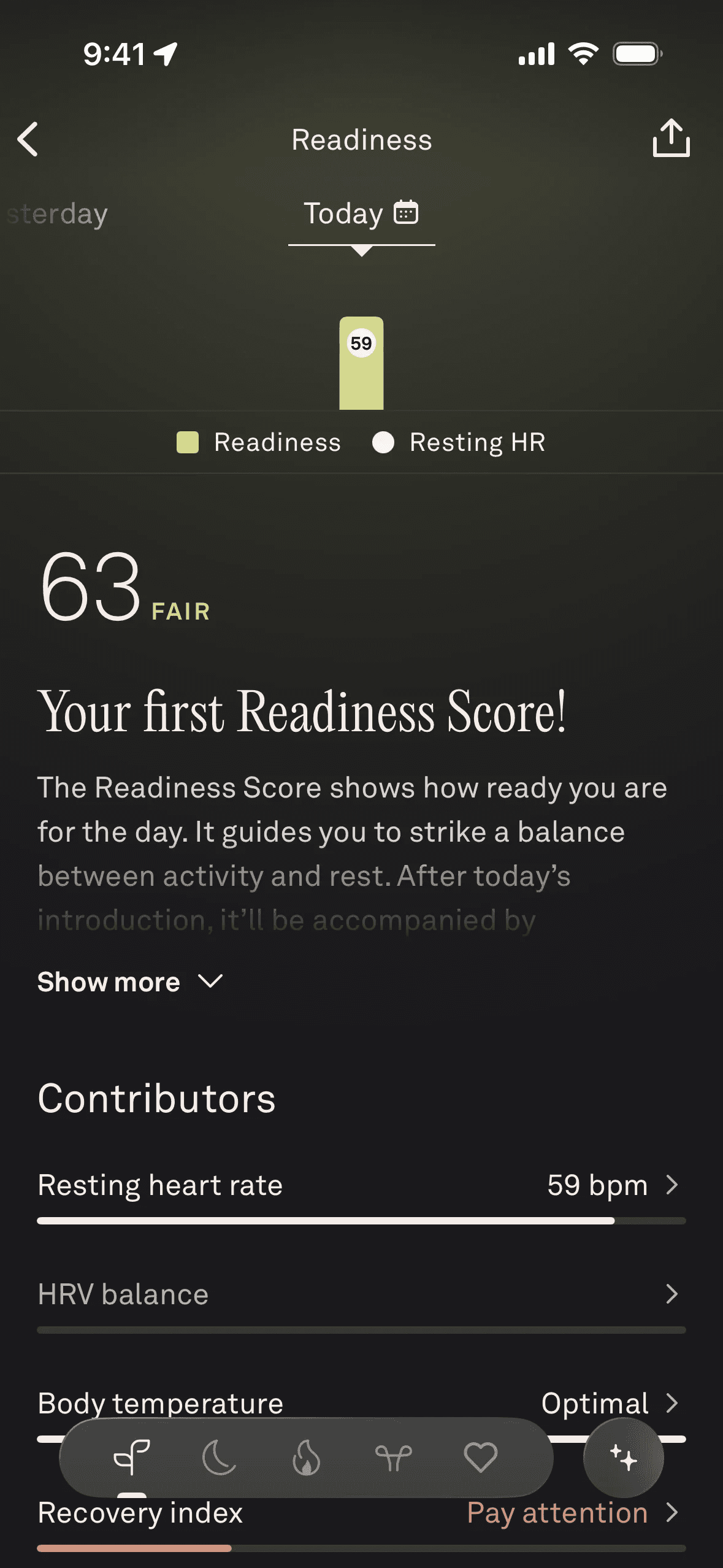
Every morning, Oura gives you a single number: your Readiness Score. It decided what heart rate variability and sleep stage distribution and respiratory rate mean together, combined them into a verdict, gave it a name, and made it the thing you check before you get out of bed to know How Ready You Are For The Day. You now have vocabulary for the state of your health that you didn’t have before Oura existed.
Apple Watch frames exercise as rings to close. The design is simple: three colored circles that fill as you move. But “I closed my rings today” became a phrase people casually say out loud, to friends who don’t own an Apple Watch, when talking about things that have nothing to do with fitness apps.
The word repeats until it becomes part of your daily life without you noticing.
AI summaries: Linktree and Binance
You open Amplitude, the analytics platform, and go to Anomaly Detection. There’s a chart, but there’s also a lone sentence at the top: 308 anomalies have triggered since June 1, 2023. This puts the whole chart into context for you.
In Linktree analytics, a message is already waiting before you’ve looked at the accompanying chart. “On Sunday, January 22, your clicks jumped to 27 from zero — your recent post is really catching eyes!”
In Binance, a cryptocurrency app, there’s a chart showing a year of Fear & Greed data, BTC price overlaid. Above it, labeled “Powered by AI,” a single sentence: “Recent trends show a shift from Fear to Neutral. Sentiment remains steady without significant extremes impacting market behavior.” Again, you read the conclusion before you see the data.
It’s the same reason you’re reading this instead of staring at a spreadsheet right now. You came for the so? The best dashboards give you the same thing.
What to leave out
Last week’s traffic is somewhere inside a certain analytics tool. The sidebar has Reports, Advertising, Explore, Configure. Reports has six subcategories. Engagement alone has seven. You click Acquisition. That’s not quite it. You try Traffic Acquisition. ...still nope. You build a custom Exploration. Fifteen minutes, three help articles and one youtube video in, you have your number.
There’s white space at the bottom of the Plausible dashboard. That’s where all of that would go.
AI can generate a dashboard in seconds. The hard part of design is knowing what to leave out from there. Plausible didn’t fail to fill in that space. They chose not to, and even wrote manifestos about why they chose not to.
Revolut does exchange rates, crypto, savings vaults, spending analytics, budget tracking, stock investing. The home screen is your balance. It’s three buttons, and everything else is one tap away.
Plausible and Revolut have nothing else in common. Restraint is the whole point.
What good dashboard design comes down to
Two thousand, one hundred and eight dashboards later, the mess is different: we get numbers now, not mud. But they keep on coming. And someone still has to decide what to build between the user and the mess.
Most of the time, people build more. More charts. More metrics. More tabs. More analysis. The mess is still there behind all of it, and now there’s a summarized mess on the board as well.
Occasionally, someone builds something that works. The answer is already there, waiting. You didn’t have to look very hard, or work very hard for it.
Designers keep searching “dashboard” on Mobbin because they’re looking for evidence that someone else figured this out. Some of them have.
I have a cashback app on my phone called ShopBack. The design is...let’s just say it’s not on Mobbin. Among a whole lot of mess, the home screen does highlight the only thing I care about: lifetime earnings. This number goes up, a little, every time I use it. Sometimes the number is 0.2 cents. I have never deleted the app.
I’m pretty sure that if this shield didn’t exist, I would have never noticed the earnings at all.
Watch: 2,108 dashboards in 8 minutes
Dashboard design statistics
This study covers 2,108 dashboard-tagged screens across 536 apps and websites on Mobbin, snapshot April 2026.
Engagement = saves + exports on Mobbin — it reflects what designers are actively collecting as references, not end-user behavior inside the apps themselves.
54.8%
Web
234 of 427 apps
40.8%
iOS
346 of 848 apps
36.8%
Android
131 of 356 apps
Dashboard coverage by platform · Over half of web apps ship a dashboard. Less than half of iOS apps do · Share of apps with 1+ dashboard-tagged screen. Baselines: 848 iOS, 427 Web, 356 Android. Snapshot: April 2026.
Dashboard screens studied across 536 apps and websites on Mobbin
2,108
"Dashboard" as a share of all free-text searches on Mobbin — the #1 term by a wide margin
8.9%
How much more designers filter for "Dashboard" than any other web pattern in the top 10
3.27×
Apps that use the dashboard as their home screen — about 1 in 5
19%